
Download BannerGPT – AI‑Powered Blog Banner Generator, Free & Secure
Overview & Core Features
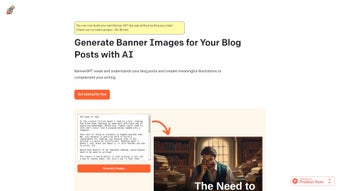
BannerGPT is an AI‑driven, web‑based graphic creation platform designed specifically for bloggers, content marketers, and website owners who need eye‑catching banner images without the expense or time required to hire a professional designer. By analyzing the headline, sub‑headings, and body copy of a blog post, the tool’s deep‑learning model produces high‑resolution illustrations that match the article’s tone, theme, and target keywords. This context‑aware approach ensures that each banner feels purposeful rather than generic, helping readers instantly understand what the content is about while also improving click‑through rates.
The service runs entirely in the cloud, which means you can access it from any device with a modern web browser—whether you’re on a Windows desktop, a macOS laptop, a Linux workstation, or a mobile phone running Android or iOS. Regular updates to the underlying AI model guarantee that the visual style evolves with current design trends, and the platform automatically applies security patches to keep data safe. Whether you manage a personal WordPress blog, a corporate news portal, or a multi‑author online magazine, BannerGPT streamlines visual storytelling, reduces production costs, and boosts SEO performance.
Key Features
- Context‑Aware Image Generation: The AI reads your post’s headline, sub‑headings, and main body to create images that reflect the core message.
- Multiple Style Templates: Choose from modern flat, vintage watercolor, minimalist line art, or bold photographic styles.
- One‑Click Export: Download banners in PNG, JPEG, or WebP formats, optimized for fast loading.
- Customizable Color Palette: Adjust primary colors to match your site’s branding without leaving the interface.
- Responsive Preview: See how the banner looks on desktop, tablet, and mobile before you download.
- SEO‑Friendly File Naming: Automatic generation of descriptive file names and alt‑text suggestions to improve search visibility.
- Secure Cloud Processing: All image generation occurs over encrypted HTTPS connections, and no personal data is stored long‑term.
- Free Tier & Affordable Upgrades: Generate up to five banners per month for free; premium plans unlock unlimited creations and priority rendering.
- API & Plugin Integration: Developers can tap into a RESTful API or install the WordPress plugin to generate banners directly from the editor.
- Batch Generation (Premium): Upload multiple article drafts and receive a complete set of banners in a single session.
Installation, Usage & Compatibility
BannerGPT is a cloud‑based SaaS solution, which means there is no traditional “installation” process on your computer. Getting started takes just a few minutes, and the intuitive workflow is built to accommodate both beginners and power users.
Step‑by‑Step Guide
- Create an Account: Visit bannergpt.com and sign up with your email or a Google account. The registration is free and includes email verification for security.
- Connect Your Blog (Optional): For seamless workflow, you can link your WordPress, Ghost, or Medium account via OAuth. This allows BannerGPT to pull draft content directly, eliminating copy‑and‑paste steps.
- Paste Your Content: If you prefer a manual approach, copy the blog post’s title and first 300 words into the text box. The AI will parse the content instantly, identifying key concepts and visual cues.
- Select a Style: Browse the style gallery and pick the visual direction that best fits your article’s mood. Each style comes with preset color palettes that you can further tweak.
- Adjust Settings: Fine‑tune color, image ratio (16:9, 4:3, square), add keyword overrides, or upload a brand logo to be incorporated into the banner.
- Generate & Review: Click “Create Banner.” Within seconds, a preview appears. Use the side‑by‑side comparison to ensure relevance, and if needed, click “Regenerate” for a fresh take.
- Download & Implement: Choose the desired format, download the file, and upload it to your CMS. The platform also provides ready‑to‑paste HTML snippets with alt‑text and structured data markup.
- Save to Library: All generated banners are stored in a personal cloud library for up to 30 days, allowing you to reuse or edit them later.
Device & OS Compatibility Windows, macOS, Linux, Android, iOS (via web browser)
Because BannerGPT runs entirely in the browser, it is compatible with all major operating systems and devices. The responsive interface works on Chrome, Firefox, Safari, Edge, and even mobile browsers on Android and iOS. Performance depends primarily on internet speed; a broadband connection ensures banner generation under five seconds, while slower connections may take up to fifteen seconds. The platform also supports dark‑mode themes for developers who prefer a low‑light workspace.
Keeping the Tool Updated
Since the service is hosted on the provider’s servers, users automatically benefit from the latest AI model improvements, security patches, and new style packs. No manual updates are required. Premium subscribers receive early access to beta features such as animated GIF banners, multi‑image carousel generation, and AI‑driven A/B testing for banner performance.
Pros, Cons & Frequently Asked Questions
Pros
- Speed and Efficiency: Fast, AI‑driven generation saves hours of design work and lets you publish articles faster.
- User‑Friendly Interface: No design experience required; intuitive UI guides every step from content input to final download.
- SEO Benefits: SEO‑friendly naming and alt‑text suggestions boost discoverability in image search and improve overall page ranking.
- Cost‑Effective: Free tier available for occasional bloggers, with affordable premium plans for high‑volume users.
- Data Security: Secure cloud processing with GDPR‑compliant data handling ensures privacy and protection.
- Cross‑Platform Access: Works on Windows, macOS, Linux, Android, and iOS without any additional software.
Cons
- Internet Dependency: Reliance on internet connectivity; offline usage is not supported, which may be limiting in low‑bandwidth environments.
- Free Tier Limits: Free tier restricts users to five banners per month, which can be restrictive for high‑volume publishers or agencies.
- Limited Fine‑Control: Advanced customization (e.g., precise layout control, vector editing) is limited compared to professional design tools like Adobe Photoshop or Illustrator.
- Learning Curve for API: While the API is powerful, developers may need to spend time reading documentation to integrate it fully.
- Style Variety: Although several templates exist, users seeking highly niche artistic styles may need to supplement with external design resources.
FAQ
Is BannerGPT really free to use?
Yes, the basic plan allows up to five banner generations per month at no cost. This free tier is ideal for hobby bloggers or small‑scale sites that need occasional visual content. If you require unlimited access, you can upgrade to a premium subscription starting at $9.99 per month, which also includes priority rendering and API access.
Can I use the generated banners for commercial projects?
Absolutely. All images created with BannerGPT are royalty‑free, and you retain full ownership for both personal and commercial use. This means you can place the banners on client websites, in marketing campaigns, or in paid advertisements without worrying about additional licensing fees.
What image resolutions does BannerGPT support?
Banners are generated at 1920×1080 pixels by default, which works well for most blog layouts and social sharing. However, before downloading, you can select custom dimensions such as 1280×720, 1200×628 (ideal for Facebook ads), or any other size supported by the platform’s aspect‑ratio selector. The service automatically optimizes the file for web performance.
Is my content stored after the banner is created?
BannerGPT processes your text in memory only for the duration of the generation. Once the banner is delivered, the source content is automatically deleted from the servers within a few minutes. No long‑term storage of your drafts occurs, ensuring privacy and compliance with data‑protection regulations.
Can I integrate BannerGPT directly into my CMS?
Yes. BannerGPT offers a simple REST API and a dedicated WordPress plugin that lets you generate banners from within your editor. The plugin adds a “Generate Banner” button to the post screen, pulls the article’s content automatically, and inserts the finished image with appropriate alt‑text and structured data markup, streamlining the workflow for frequent publishers.
BannerGPT delivers a compelling blend of speed and creativity. The AI consistently captures the essence of my articles, and the free tier is generous enough for occasional use. While power users may crave deeper design controls, the platform’s ease of use and SEO benefits make it a standout choice for most bloggers.
Conclusion & Call to Action
In a crowded content landscape, visual appeal can be the difference between a fleeting glance and a loyal reader. BannerGPT equips writers with a fast, secure, and affordable way to produce custom blog banners that reinforce storytelling and improve SEO performance. The AI’s context‑aware engine eliminates the need for a graphic designer, while the web‑based interface guarantees cross‑platform compatibility on Windows, macOS, Linux, Android, and iOS. For anyone looking to upgrade their blog’s aesthetics without breaking the bank, BannerGPT is a practical solution that scales from hobbyists to professional publishers.
Ready to give your posts a visual boost? Sign up for a free account today and start generating striking banners in seconds. Premium plans are available for unlimited usage, priority rendering, and API access—perfect for high‑traffic sites and agencies. Elevate your content, attract more readers, and enjoy the confidence that comes from having professional‑grade visuals at your fingertips.



.png)



